
Opened 19 years ago
Closed 18 years ago
#5015 closed defect (fixed)
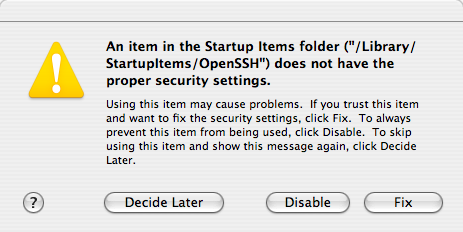
BUG: Finder complains that openssh has wrong security settings
| Reported by: | mjs@… | Owned by: | yeled@… |
|---|---|---|---|
| Priority: | Normal | Milestone: | |
| Component: | ports | Version: | 1.0 |
| Keywords: | Cc: | mjs@…, markd@… | |
| Port: |
Description
On login, Finder complains that "An item in the Startup Items folder ("/Library/StartupItems/OpenSSH") does not have the proper security settings." It gives the option to "Decide Later", "Disable" or "Fix". (See screenshot.)
Hrm, can't figure out how to attach a file, will try on the next screen.
Attachments (1)

Change History (13)
Changed 19 years ago by mjs@…
| Attachment: | openssh.png added |
|---|
comment:1 Changed 19 years ago by yeled@…
| Owner: | changed from darwinports-bugs@… to yeled@… |
|---|
comment:2 Changed 19 years ago by toby@…
| Component: | base → dports |
|---|
comment:3 Changed 19 years ago by mww@…
| Summary: | Finder complains that openssh has wrong security settings → BUG: Finder complains that openssh has wrong security settings |
|---|
comment:4 Changed 19 years ago by ghost@…
This has to do with the directory being a symlink I believe.
comment:6 Changed 19 years ago by mjs@…
(In reply to comment #3)
what OS X version, and what openssh version is this?
OS X 10.4.2 openssh 4.2_0
And yes, /Library/StartupItems is a symlink.
comment:7 Changed 18 years ago by j.anthony.smith@…
Hi Michael,
Had the same problem with OSX 10.4.3 and OpenSSH 4.2_0. I went to a terminal and changed directory to /Library/StartupItems/OpenSSH and did 'sudo chmod 777 OpenSSH'
It was initially set at 755 and I tried 775 but the complaint came back. Not sure whether it's a good idea to give OpenSSH all_world read/write/execute access so I set it back to 755 and will wait for Charlie's comment?
comment:8 Changed 18 years ago by j.anthony.smith@…
(In reply to comment #5)
Hi Michael,
Had the same problem with OSX 10.4.3 and OpenSSH 4.2_0. I went to a terminal and changed directory to /Library/StartupItems/OpenSSH and did 'sudo chmod 777
OpenSSH'
It was initially set at 755 and I tried 775 but the complaint came back. Not sure whether it's a good idea to give OpenSSH all_world read/write/execute access so I set it back to 755 and will wait for Charlie's comment?
Woops. Forgot to say that changing to chmod 777 fixed the error message.
comment:9 Changed 18 years ago by yeled@…
| Status: | new → assigned |
|---|
Sorry i've let this stagnate because I couldn't replicate it!
I'll try again today.
comment:10 Changed 18 years ago by yeled@…
I think for those on 10.4 they can wait for dports 1.2 and everything will fix itself .. by migrating to launchd.
comment:11 Changed 18 years ago by markd@…
| Cc: | markd@… added |
|---|
Can anyone confirm of the problem is fixed on DP 1.2?
comment:12 Changed 18 years ago by markd@…
| Resolution: | → fixed |
|---|---|
| Status: | assigned → closed |
It appears this problem has been fixed by subsequent updates -closing.
error message displayed by finder at login